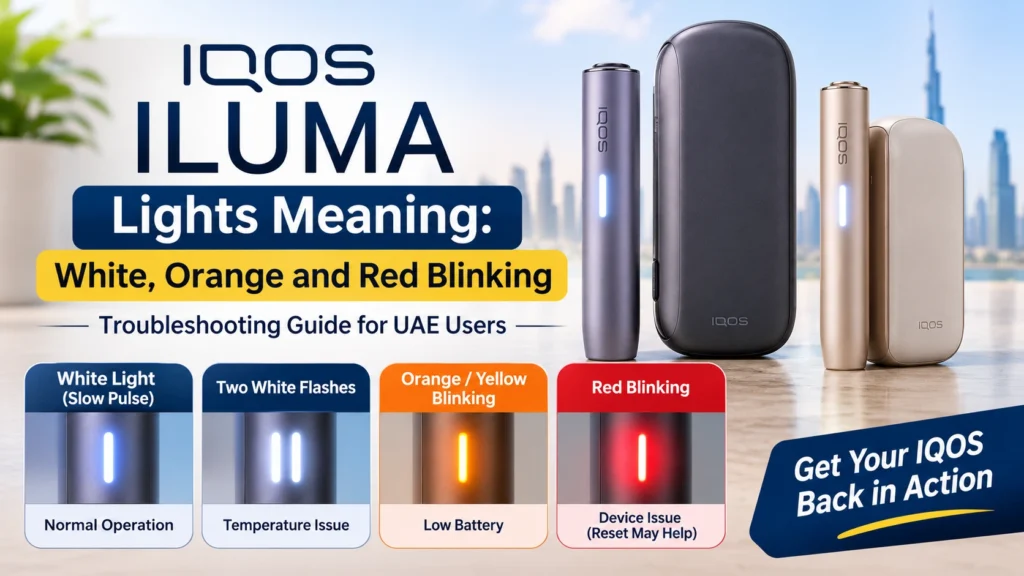
Seeing your ILUMA blinking white light twice before the device switches off can leave you wondering if the battery is flat, the device has overheated, or it’s behaving normally. The answer depends on where the light appears, how it flashes, and when it happens. A slow white pulse during normal operation means something different from two quick flashes on an ILUMA ONE.
TEREA.ae put this troubleshooting guide together for existing device owners in Al Barsha 1, Dubai, and across the UAE. If your device was just in a parked car near Mall of the Emirates, start with the temperature check. If it flashes red indoors at room temperature, go straight to the reset section for your model.
IQOS ILUMA light meanings at a glance
| What you see | Where you see it | What it usually means | What to do first |
| White light pulses slowly | Holder or ONE light strip during normal operation | Startup or an end-of-use signal, depending on timing | Note when the pulse begins and whether the device vibrates |
| Two quick white flashes, then the lights go out | ILUMA ONE or ILUMA i ONE light strip | The device may be outside its operating temperature range | Let it return to room temperature and check again |
| Solid white lights | Holder, Pocket Charger, or ONE light strip | Charge or operating status, depending on the model and timing | Check whether the device is plugged in or you just pressed the button |
| Yellow or orange blinking | Holder or ONE light strip | Low charge on the models covered here | Charge the affected component |
| Red blinking | Holder, Pocket Charger, or ONE light strip | A device issue that may call for a reset | Identify your model before choosing the reset button |
Why is my IQOS ILUMA blinking white?
A slow white pulse often indicates normal operation. Two quick white flashes followed by the lights switching off can indicate a temperature issue on ILUMA ONE and ILUMA i ONE. Check whether the light appears on a separate holder, a Pocket Charger, or a single device with a light strip before acting.
Pulsing white during startup or near the end of use
A gradual white pulse during startup is a normal status signal on applicable ILUMA models. A pulse accompanied by a vibration near the end of use is also expected. Timing is the easiest way to tell these signals apart. If the pulse follows the usual startup sequence or comes near the end, a reset is generally unnecessary.
If white flashes interrupt startup, count them and see whether the lights go out. That observation gives you more to work with than the color alone.
White light blinks twice, then turns off
On ILUMA ONE and ILUMA i ONE, two quick white flashes followed by the lights going out can indicate that the device is outside its operating temperature range. This can happen after the device has been left in a parked car in Al Barsha, carried in direct sun around Dubai Marina, or moved from an unusually cold environment.
Bring it indoors and let it return to room temperature naturally. Then check it again. If the pattern persists, record the exact model and flash count. Flash patterns vary across the ILUMA family, so use the instructions for the model you own.
Solid white lights while charging or checking the battery
Solid white lights usually show status. On the ILUMA i ONE, four solid white lights that subsequently turn off can indicate a completed charge. On a two-piece ILUMA, the white lights you see after briefly pressing a button may show the charge of the holder or Pocket Charger. Start by identifying which component lit up.
If your case and holder came from different devices, check the IQOS ILUMA holder and charger compatibility guide before swapping accessories to troubleshoot.
What does an orange or yellow light mean on IQOS ILUMA?
A blinking orange or yellow light usually points to low charge. The manual may call it yellow even if it looks orange to you. On the original ILUMA ONE, the bottom light on the strip can blink yellow when the battery is low. Charge the ONE directly using compatible charging equipment. On a two-piece model with a low holder battery, place the holder in its charged Pocket Charger.
If nothing changes, check the power source and cable first. On a two-piece model, confirm that the Pocket Charger itself has power and that the holder is seated properly. If you’re unsure whether you have a ONE, PRIME, or standard model, compare the names and layouts on the IQOS ILUMA device page for Dubai, Abu Dhabi and Sharjah with the label on your device or box.
Why is my IQOS ILUMA blinking red?
A blinking red light can signal a device issue. The reset button depends on whether your model is a two-piece kit or a one-piece ONE. Note where the red light appears before you begin, especially if both the holder and charger have indicators.
Red light on the holder or Pocket Charger
For the original IQOS ILUMA and ILUMA PRIME two-piece kits, place the holder in the Pocket Charger and press the Pocket Charger button for 10 seconds. A brief white flash sequence confirms the reset on the documented models. If the red light returns, record whether it appears on the holder or charger and contact manufacturer support. If your model name includes i, check the instructions for that specific model and display before proceeding.
Red light on ILUMA ONE or ILUMA i ONE
On these one-piece models, use the button on the device itself. Hold it down for 10 seconds and watch for the status-light sequence that confirms the reset. The brief white flashes during that sequence are expected. If red blinking returns after charging and resetting, contact manufacturer support. If the device is visibly damaged or becomes unusually hot, stop using it and have it assessed.
When to get IQOS device help in Dubai
If you’re searching for “IQOS support near me” from Al Barsha 1, Barsha Heights, or Jumeirah, identify your model before travelling. Confirm that the location handles device diagnostics, warranty assessments, or repairs for your model. If the problem started after a cable change, a drop, or time in a hot car, mention that when describing the issue.
For an existing order, use the TEREA.ae homepage and customer support details to find the published contact information. Call now for existing-order help and have your order reference ready. If you’re checking a Dubai order’s delivery details, consult the TEREA.ae Dubai order and delivery information and refer to the timing in your order confirmation.
Why choose TEREA.ae for device information and order support?
TEREA.ae gives Dubai and UAE readers one place to check device names, compatibility, and existing-order information. This guide separates the holder, Pocket Charger, and one-piece ONE because knowing which part flashed helps you avoid following the wrong procedure. If you’re unsure whether a label refers to the device or its consumable, start with the TEREA product terminology guide for UAE readers.
TEREA.ae operates online and identifies itself as an independent retailer. For an order query, share your order reference and the exact model shown on the confirmation. For a diagnosis or warranty assessment, go to manufacturer support. Get a repair quote: Ask your chosen provider whether it offers a free written assessment or quote before authorizing any work.
Frequently asked questions
What does it mean when my IQOS ILUMA blinks white twice?
On ILUMA ONE and ILUMA i ONE, two quick white flashes followed by the lights switching off can indicate that the device is outside its operating temperature range. Bring it indoors and let it return to room temperature. If it still flashes, record the model and the sequence for support.
How do I fix a blinking orange light on my IQOS ILUMA?
Start by charging the component that shows the warning. If the bottom light on your ILUMA ONE blinks yellow or orange, connect the device to compatible charging equipment. If a two-piece model’s holder is low, put it in its charged Pocket Charger. Check the power source if the indicator stays the same.
How do I reset an IQOS ILUMA with a red light?
On the original ILUMA and ILUMA PRIME, seat the holder in the Pocket Charger and hold the charger button for 10 seconds. For ILUMA ONE or ILUMA i ONE, hold the button on the device itself for 10 seconds. If the red light returns, record the pattern and contact manufacturer support.
Why does my IQOS ILUMA flash white after being left in a car?
A parked car in Dubai can expose the device to heat outside its operating range. If your ONE flashes white twice and turns off, move it indoors and let it cool naturally before trying again. If the same pattern repeats at room temperature, share the flash sequence and model with support.
What is the best first check if my IQOS ILUMA won’t charge?
Confirm which part is failing to charge. On a two-piece device, check whether the Pocket Charger responds to a short button press and whether the holder is seated properly. On a ONE model, check the power source, compatible cable, and whether the charging port is dry. Record any light sequence you see.
How much does it cost to fix an IQOS red-light issue in Dubai?
The cost depends on the model, the diagnosis, your warranty status, and the provider. A red light alone can’t tell you what a repair will cost. Have your proof of purchase ready, ask whether there is a diagnostic fee, and request a written quote before approving any paid work.